Week Planner stores workouts against weekdays. In the example below, a 96-minute tempo ride belongs to Tuesday until you choose a calendar week. You can apply the template again later; the sessions already on your calendar keep their original prescriptions.
The screenshots use synthetic training data in the web app. Week Planner is included in Free and Pro.
A template stores weekdays
In Workout Library → Week Templates → Add week template, the saved workout library sits beside the seven-day schedule. Choose a day in Add to, then add a workout. Desktop also supports dragging from the library onto a day.
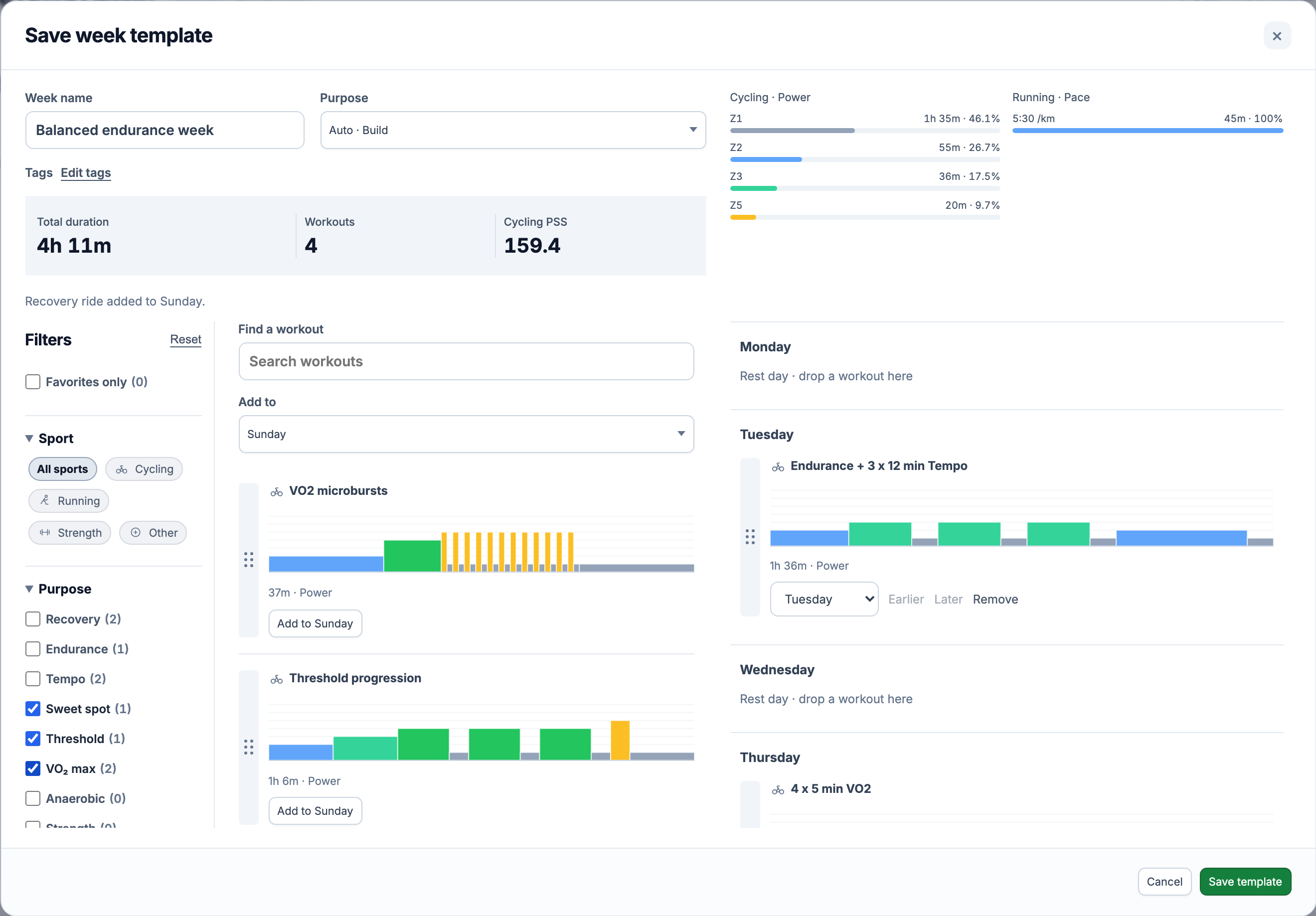
This is the schedule used in the screenshots:
| Day | Session | Planned time |
|---|---|---|
| Monday | Rest | — |
| Tuesday | Endurance + 3 x 12 min Tempo | 1 h 36 min |
| Wednesday | Rest | — |
| Thursday | 4 x 5 min VO2 | 1 h 5 min |
| Friday | Rest | — |
| Saturday | Easy Run | 45 min |
| Sunday | Recovery ride | 45 min |
Find a workout searches names. Filters cover favorites, sport, purpose, duration and tags; Cycling + VO2, for example, narrows the library to candidate interval sessions. Reset filters restores the full list. On a phone, Week and Workouts are separate tabs, with the same Add to day selector.
An empty day contains no planned session. A workout can appear on several days, and cycling, running, strength and other saved workouts can share a template.
Saturday can hold both sessions
If Sunday is no longer free, move Recovery ride to Saturday using its day selector or, on desktop, drag it there. Earlier puts it before Easy Run; Later moves it after the run. These controls set the order within a day, not start times.
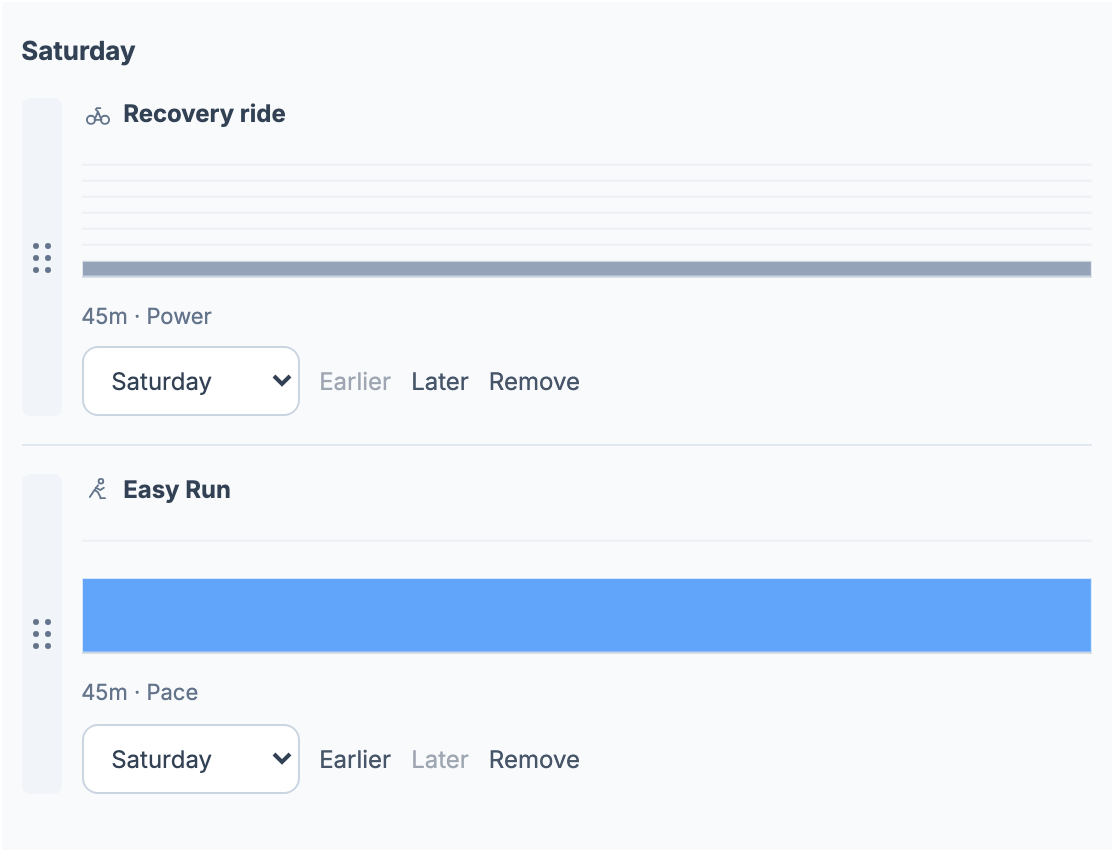
Remove deletes this placement from the draft, leaving the library workout intact. When you close an edited draft, Keep editing returns to it; Discard changes leaves the saved template intact.
What the 159.4 cycling PSS includes
The duration total includes all four sessions: 96 + 65 + 45 + 45 = 251 minutes, or 4 h 11 min. The 159.4 cycling PSS has a narrower scope. We add the saved PSS estimates from the three cycling power workouts; the run contributes time, but no cycling PSS.

The zone bars also have separate denominators. 46.1% is 95 Zone 1 minutes divided by 206 minutes of cycling power. The run shows 100% because all its 45 minutes use one pace target. Combining those percentages would hide what each session was prescribed to do, so EffortSignal groups the bars by sport and target type.
Repeated blocks contribute every repetition. Pace rows retain the actual pace as well as the zone: 5:30/km remains a different target from 5:00/km. The distribution uses the zones saved with the workout, rather than relabelling old prescriptions when profile thresholds change.
If only some power workouts have a saved PSS estimate, the summary reports that coverage. If none do, it displays Unavailable. Heart-rate and pace sessions are not converted into cycling PSS to fill the gap.
Planned load documents the estimates; Training Zones covers the targets. These numbers describe the prescription. The comparison with a recorded session belongs in Planned vs Completed.
What we save with a week
Save template stores the name, weekdays, session order and a snapshot of each workout. It does not keep a live link to the latest version in the workout library.
That matters when you edit Tuesday’s tempo session. An existing template still contains the original three 12-minute efforts. Editing or deleting that template also leaves its dated plans unchanged. The trade-off is that a correction in the library does not propagate automatically. Edit the week, remove the old placement and add the revised workout to update it.
Purpose → Auto is a zone check. A week with RPE or untargeted blocks gets Other. Otherwise, Zone 1 throughout gives Recovery; a mix that reaches Zone 2 but no higher gives Base; Zone 3 or above gives Build. There is no race-date calculation behind the label. You can select Base, Build, Recovery, Taper, Race, Maintenance or Other yourself, and attach labels with Edit tags.
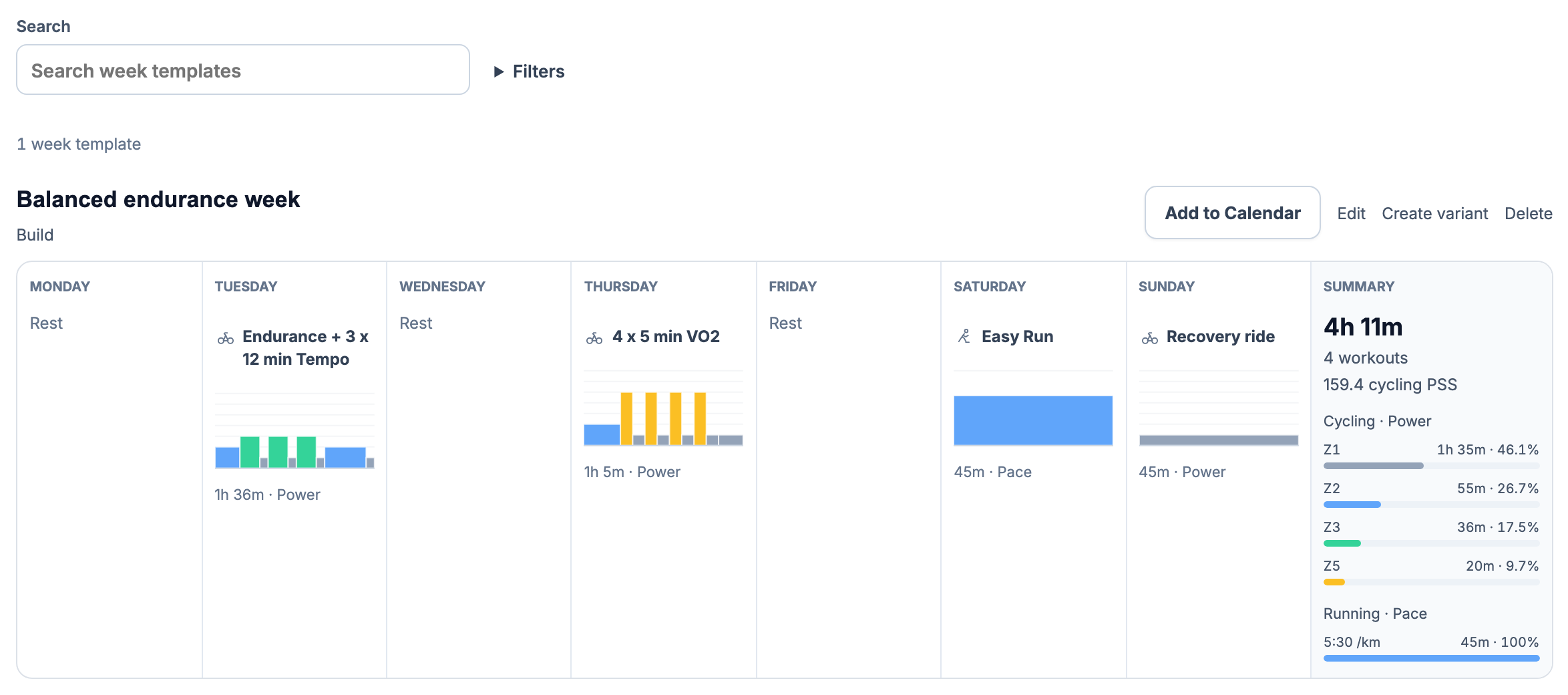
The template library searches names and filters by purpose, contained sport, total duration or tag. Create variant opens a copy for editing. Giving it a different name alone will not get past the duplicate check.
We compare the prescription on each weekday, in order: sport, target type, step durations, targets and cadence. Repeated sets are expanded for this comparison. Two weeks with differently named workouts can therefore count as the same plan. The editor offers Open existing template when it finds a match.
There is another way to create one: Save to template in a Training Calendar week’s menu. It collects the scheduled workouts from that week. Recorded activities, notes and events stay in Calendar; they are not converted into workout steps.
Add and Replace change different plans
On a saved template, Add to Calendar asks for First date of the target week. We map each weekday onto the seven days starting at that date. The calendar’s first-day preference controls the display order; the chosen range does not have to start on Monday.
For a range starting 19 October 2026, Tuesday’s tempo session lands on 20 October, followed by VO2 on 22 October, the run on 24 October and the recovery ride on 25 October.
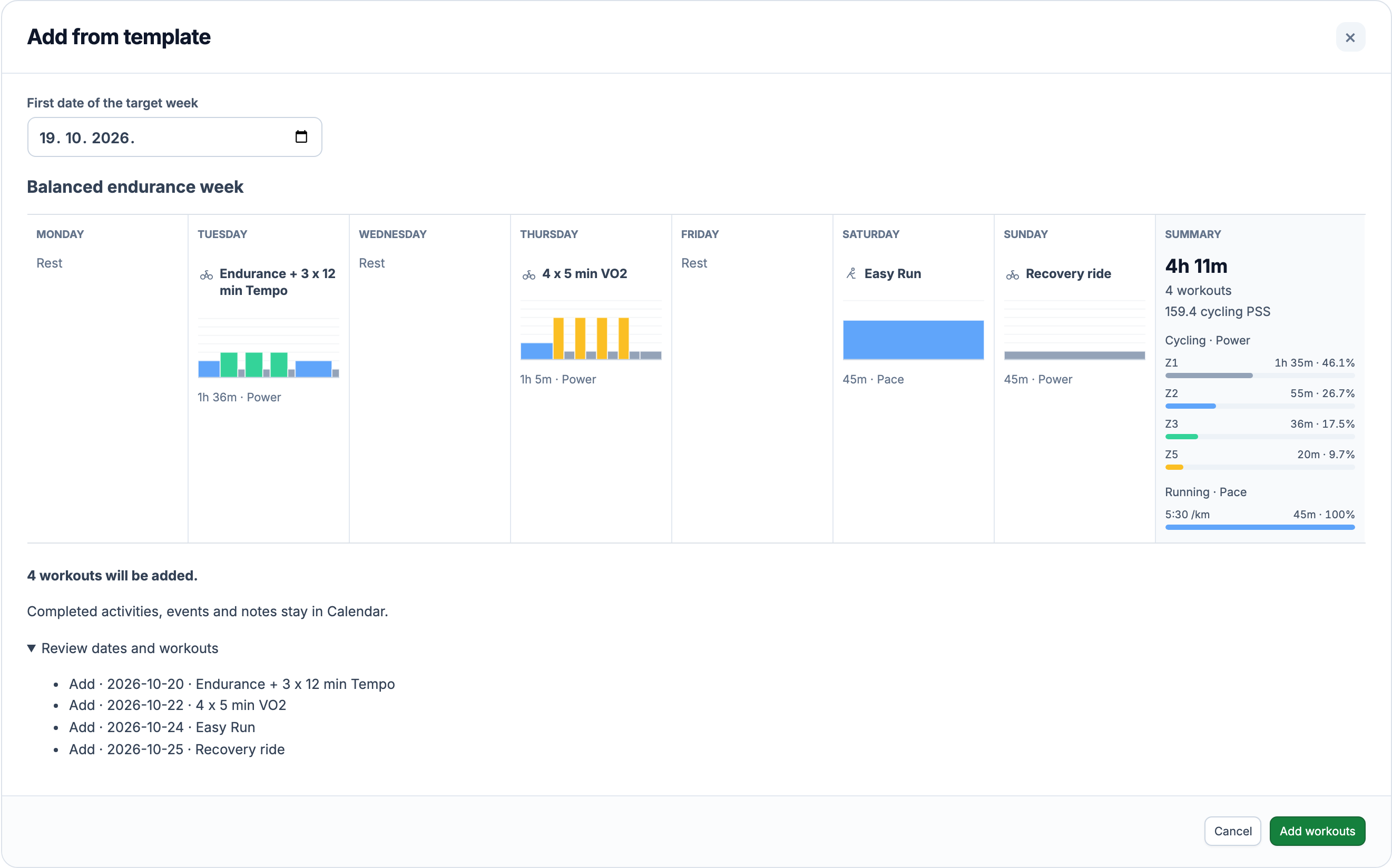
From Calendar, open a week’s menu and choose Add from template or Replace from template. That week supplies the destination; the chooser searches saved templates by name, purpose or tag.
| Action | Effect on the destination week |
|---|---|
| Add from template | Adds every template session alongside the existing plans, including on days that already contain a workout. |
| Replace from template | Removes unfinished, unmatched plans in the destination week, then adds the template sessions. Plans matched to completed activities are kept. |
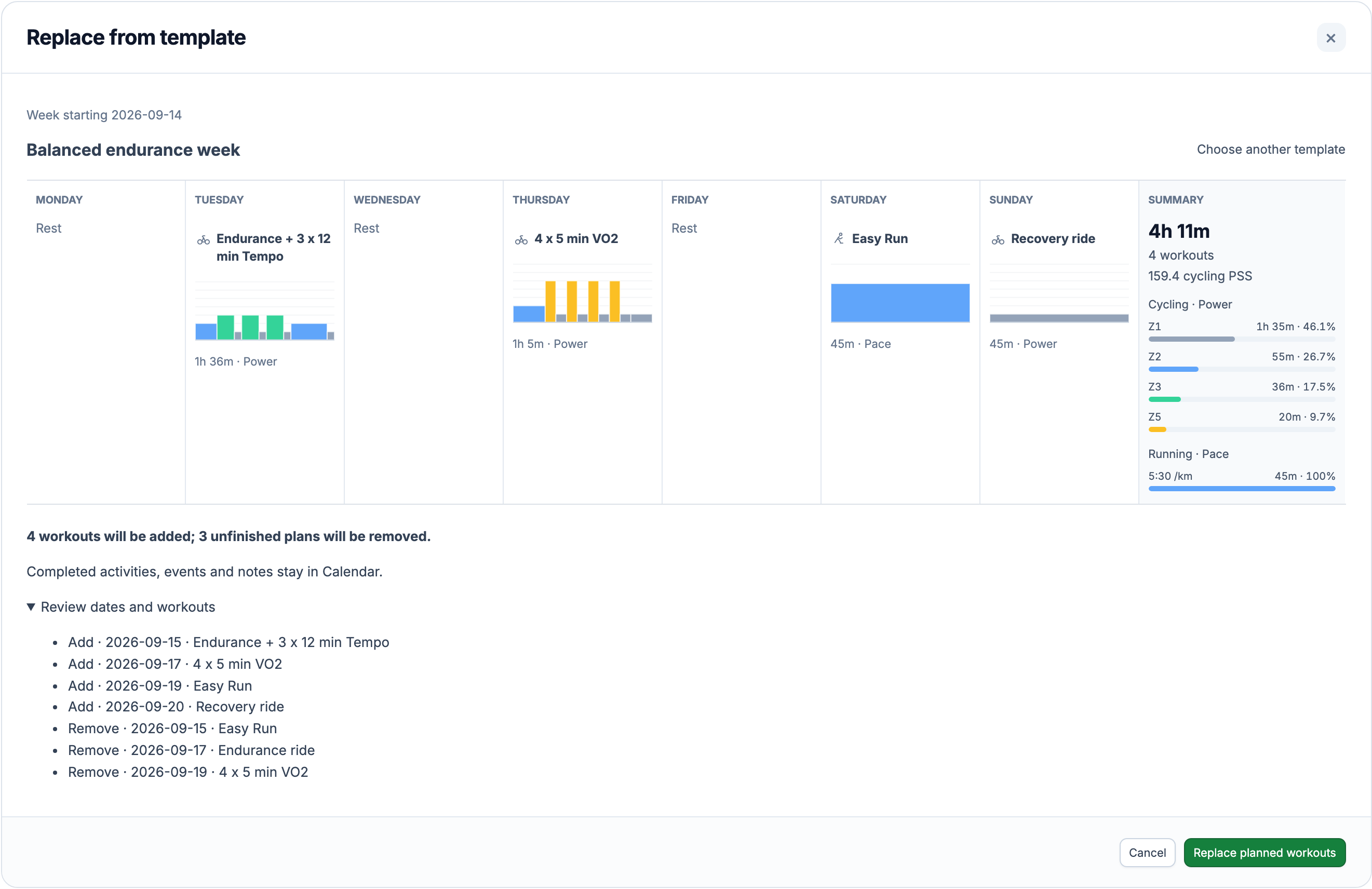
Open Review dates and workouts to inspect those changes. Add workouts or Replace planned workouts confirms them. Cancel and Escape close the preview without changing Calendar. Completed activities, notes and events remain in place.
Applying a template does not send workouts to Garmin or Wahoo. It creates dated plans in EffortSignal; delivery of an individual workout is a separate action.
A 96-minute ride on a 45-minute day
For Tuesday 29 September, we set a 45-minute availability limit in the demo account. The template’s 96-minute tempo ride exceeds it. The preview reports an Availability conflict, and Add workouts is disabled.
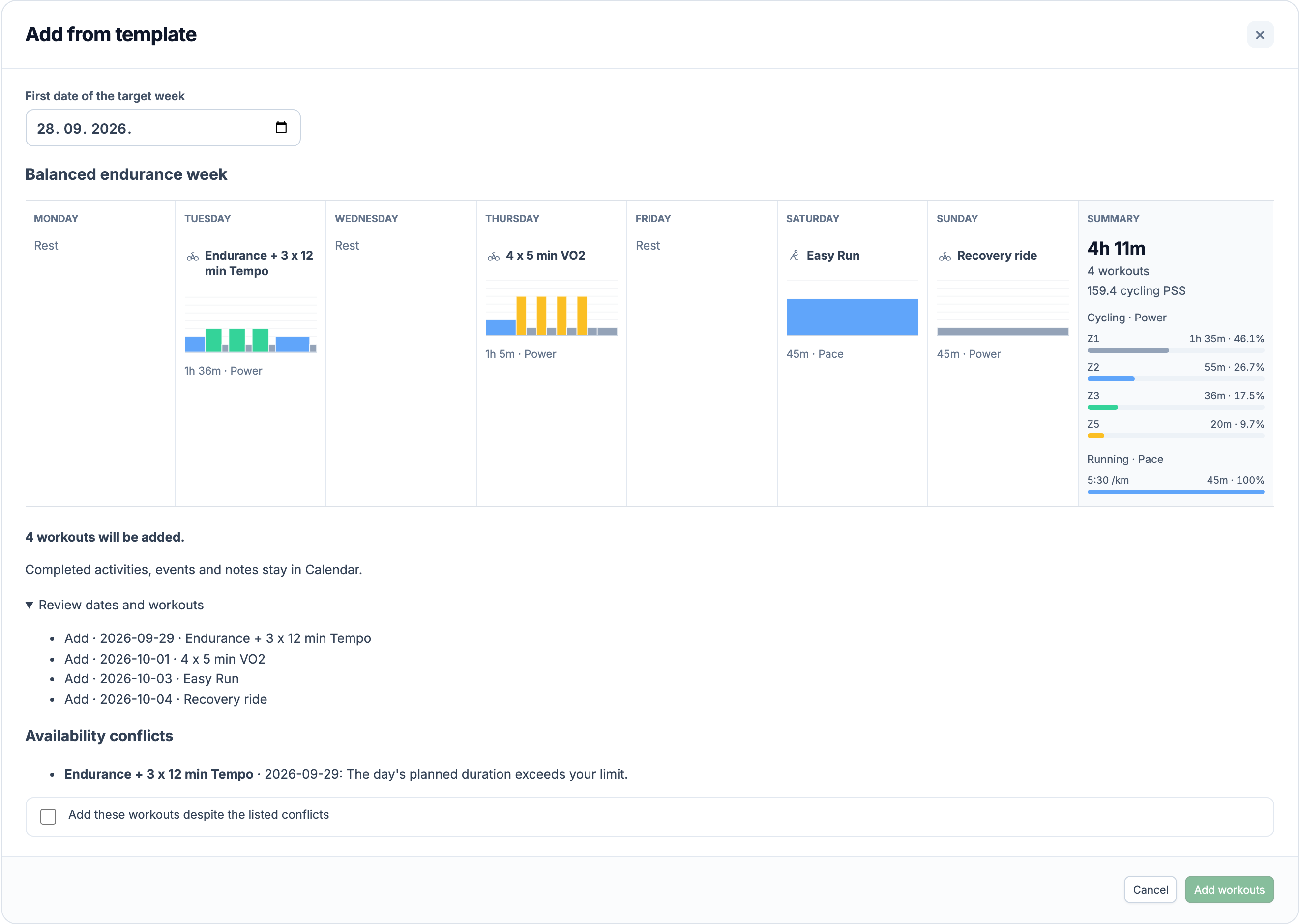
Cancel to change the schedule, or select Add these workouts despite the listed conflicts if you intend to keep it. The check also covers restricted sports, intensity and unavailable periods. It evaluates the resulting calendar week: Add includes existing plans; Replace excludes the unfinished plans marked for removal.
If the template, calendar or availability changes after the preview was calculated, Refresh preview shows the current result before you apply it. Availability explains the restrictions themselves.
100 workout placements per template
The limit is 100 placements, not 100 distinct library workouts. The same recovery ride on Tuesday and Friday counts twice. Saving requires a name and at least one workout.
Week Planner is included in Free and Pro in the web app. It does not generate a training program or reschedule workouts from recovery data; the sessions and their weekday positions are yours to choose.
All Pro features are free through January 31, 2027. No credit card or automatic charges. After Early Access, keep using Free or choose Pro. See Free and Pro plans.