Plan a cycling session in EffortSignal and take it to MyWhoosh as a ZWO file. Set the duration and power of each effort, group repeated intervals and save a version you can reuse. Import the download through MyWhoosh’s own web workout editor when you are ready to ride.
Set the targets for your indoor ride
In the web app, open Workout Library, choose Create workout and select Cycling with a power target. Use % FTP for a session that scales with your threshold, or watts when you want to author specific power values. ZWO export uses relative power in either case.
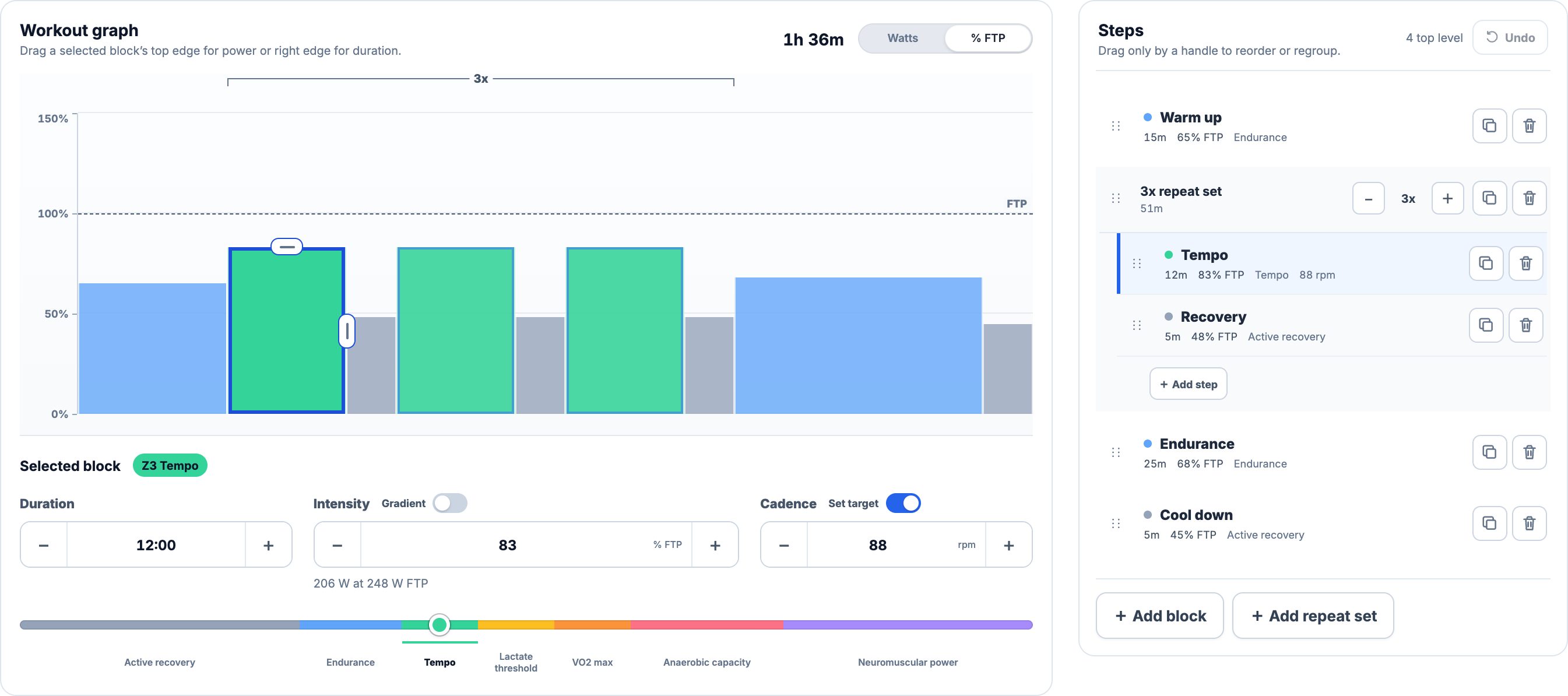
Select a block to set its duration, power and optional cadence. The graph lets you change duration with the right-hand handle and intensity with the top handle. The numeric controls are useful for an exact target, such as 12 minutes at 83% FTP with a cadence of 88 rpm.
Arrange repeat sets and gradual changes
Put an effort and its recovery inside a repeat set, then choose how many rounds to ride. Changing a child step changes every repetition. Use the Steps list to reorder blocks, and Duplicate when you want an independent copy with different targets.
A power gradient has a start value and an end value. It can rise during a warm-up or fall during a cool-down. ZWO retains the transition as a ramp. A steady block keeps one target throughout. Step names are written as text cues, and cadence targets are included when set.
The exported order includes every repeat. Check the last recovery as well as the work intervals: a recovery inside the set also follows its final effort. The total duration helps you catch an extra round or an unexpectedly long recovery before saving.
Download the saved session as ZWO
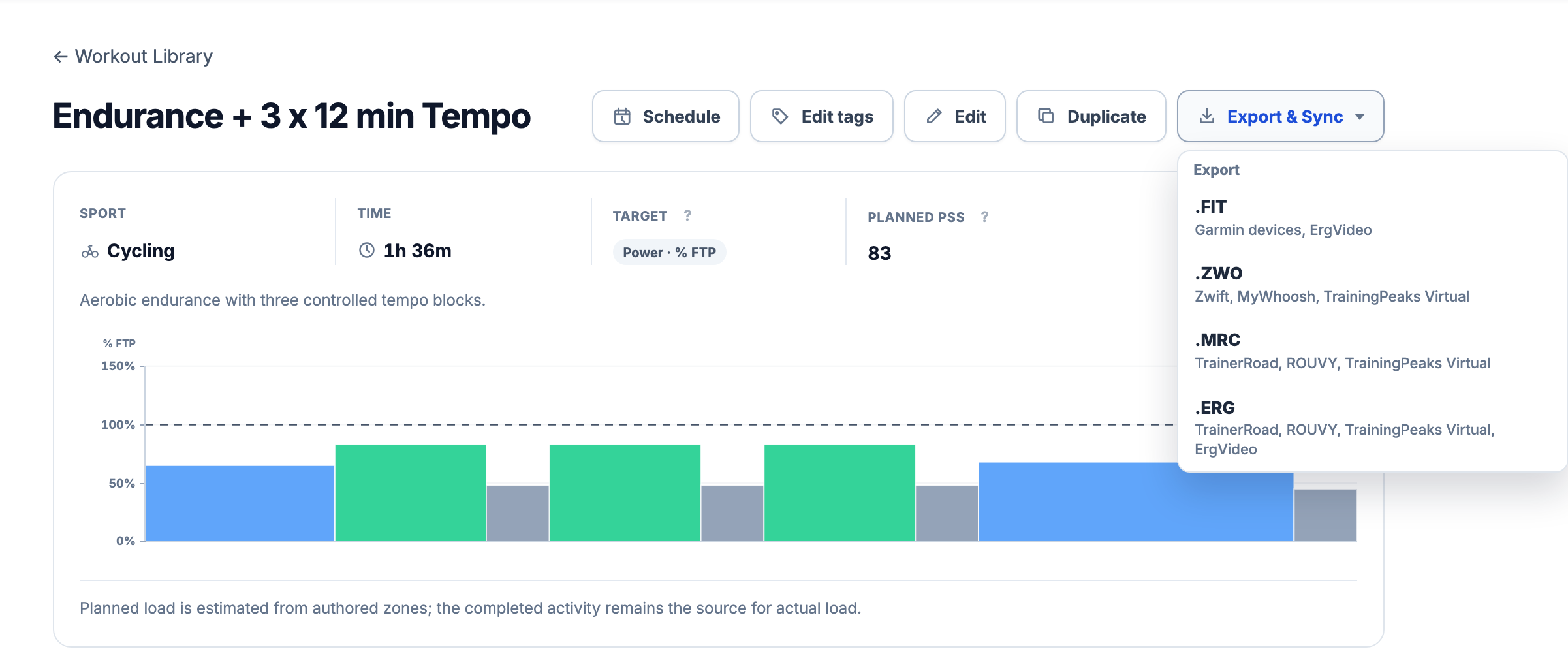
Choose Save workout. On the saved session, open Export & Sync and select .ZWO, which lists MyWhoosh as a compatible app. This downloads the file you will import into MyWhoosh’s web editor. EffortSignal does not connect to your MyWhoosh account or send the workout automatically.
Continue in MyWhoosh’s web editor
Sign in to MyWhoosh’s workout editor with the account you use for riding. Use its workout import option to choose the downloaded ZWO file, review the session and complete the save or export to MyWhoosh. Then open your custom workout in the MyWhoosh app.
Compare the imported duration, interval order and power profile with the saved workout in EffortSignal. Check cadence and cues if you depend on them during the ride. The receiving app controls how it displays the file’s contents.
Check the power before starting
A ZWO file carries FTP-relative targets. At 250 W FTP, an 80% step is 200 W. At 280 W FTP, the same step is 224 W. Matching FTP values in EffortSignal and MyWhoosh keeps the displayed targets consistent.
For a workout built in watts, EffortSignal needs a current FTP to calculate the exported percentages. A workout built in % FTP can be exported without that conversion. After import, review the actual watts in MyWhoosh; the original watt targets are not locked into a relative-power file.
Work within the ZWO export limits
EffortSignal exports cycling power sessions with up to 250 expanded steps to ZWO. Repeats count once for each step you will perform. Heart-rate, pace and RPE targets are outside this export, even though the broader workout builder supports other sports and targets.
If ZWO does not appear, check the sport, target type, expanded step count and FTP needed for a watts-based workout. A file download also needs to finish successfully before import. The availability of an export option alone does not mean the workout is already in MyWhoosh.
Save variants without losing the original
Keep the reusable session in Workout Library. Duplicate it for a shorter version or a different number of repeats. Training Calendar can place a snapshot on a date, but that calendar action does not schedule or deliver a workout inside MyWhoosh.
Edits made after export stay in EffortSignal until you download and import another file. The copies are independent. Workout building and supported file export are included in Free and Pro; you use your own MyWhoosh account and compatible equipment to ride the session.
Related workout guides
All Pro features are free through January 31, 2027. No credit card or automatic charges. After Early Access, keep using Free or choose Pro. See Free and Pro plans.