Estimated FTP uses the power efforts in your cycling recordings to suggest a threshold in watts. Open Power zones to see it beside your saved FTP, check its confidence and source, then choose whether to use the estimate. Your saved FTP stays in use until you accept a change.
Screenshots use synthetic cycling data in the web app. The two methodology diagrams explain the calculation; they are illustrations, not additional screens in the app. eFTP is included in Free and Pro.
These examples describe saved eFTP v1 estimates. New calculations combine indoor and outdoor cycling across recording devices and cap confidence at Medium. Previously saved estimates retain their original model inputs and confidence.
Read the two values in Power zones
Open Account settings → Power zones → Cycling. Under Functional threshold power, the left column shows your saved FTP, which is used for relative power metrics. The right column shows eFTP, its confidence label and the recorded device context. On a phone, the two values stack vertically.
Below them, a sentence gives the difference in watts. In this example, FTP is 260 W and eFTP is 280 W. The buttons offer Use 280 W as FTP and Keep 260 W. The editable FTP field and How was this FTP determined? selector remain below the estimate.
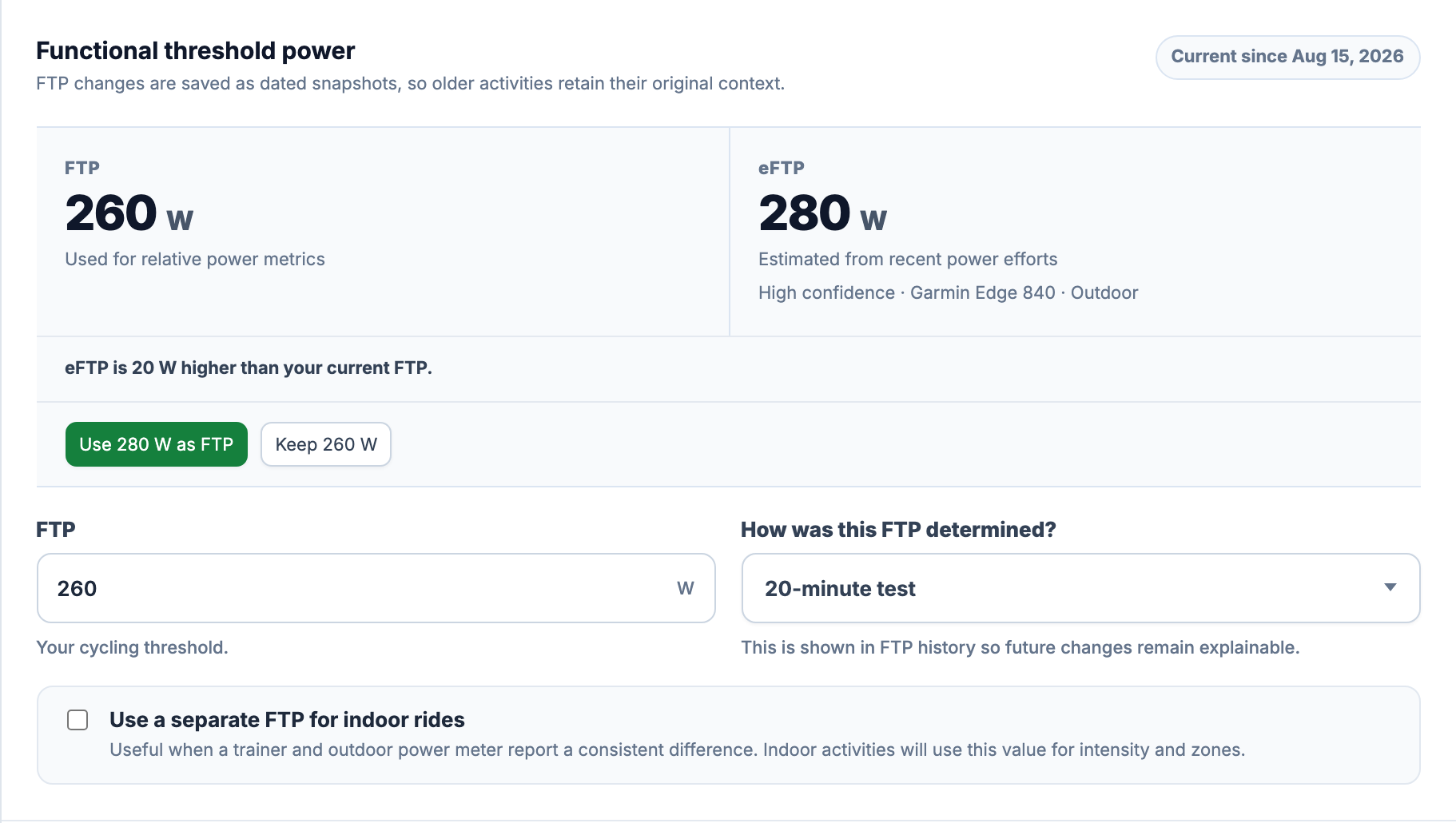
FTP here means functional threshold power: the cycling benchmark saved in your account and used by calculations such as Power Intensity. eFTP is a separate observation calculated by EffortSignal. A device-supplied FTP reading, a manually entered test result and an EffortSignal estimate retain different methods in your settings and history.
Which rides and efforts enter the calculation?
For each source, EffortSignal looks back 180 days from the calculation time. It selects available, compatible power-duration results from published cycling activities in that window. Deleted activities are excluded. Running power does not enter cycling eFTP.
There are four target durations: 5, 10, 20 and 30 minutes. At each duration, the model takes the highest positive, finite power value available for that source. These are best average powers across sustained windows, not the peak sample in a ride. The five-minute result can come from one activity and the thirty-minute result from another.
The calculation uses recorded efforts, so it cannot tell that an easy ride left plenty in reserve. It also does not require a named FTP test. If you have only recorded easy efforts, the available bests may understate what you could produce. Bring recordings in through Device Sync or Import and Export. The Power & HR Curves guide explains how the underlying duration values are extracted and how gaps affect them.
Device identity and indoor rides
Source groups use the retained device manufacturer, product and serial number, together with indoor or outdoor status. Case and punctuation differences in device names are normalised. If no device identity is available, each recording gets its own source group instead of being combined with other unidentified files.
This grouping depends on the metadata in the recording. A head unit’s identity is not proof that the same physical power meter was used every time. Conversely, using two recording devices with one meter can split the evidence. Indoor and outdoor recordings stay separate even when the device identity matches.
How the model is chosen
EffortSignal checks these options in order:
- Several durations, at least two activities. The preferred fit needs at least three of the four target durations, including one at 10 minutes or shorter and one at 20 minutes or longer. The selected best efforts must come from at least two activities. It fits all selected points.
- A five-minute and twenty-minute pair. If the first route is unavailable, a 5/20-minute pair can be used, including a pair from the same recording.
- One long effort. Otherwise, the model uses the longest available target duration of at least 10 minutes. This fallback relies more heavily on a fixed duration-conversion assumption. A five-minute effort alone is insufficient.
The number of rides in your account is not the number of independent efforts in the model. If one recording supplies every selected best, it does not meet the two-activity requirement for the first route.
The critical-power fit and upper limit
The first two routes fit the relationship below, with duration t in seconds, power P in watts, a fitted CP in watts, and W′ in joules. W′ controls how far the fitted short-duration power sits above CP. The implementation fits a straight line against 1 / t using least squares.
P(t) = CP + W′ / tCP is an intermediate model result. Before producing eFTP, the calculation also takes a long effort as an anchor: the longest selected duration for the multi-point fit, or the twenty-minute effort for the 5/20 pair. The fallback uses its single long anchor.
P20 equivalent = anchor watts × (anchor seconds / 1200)^0.07
upper limit = 0.95 × P20 equivalent

eFTP = min(CP, upper limit)
single-anchor eFTP = upper limit
The result is rounded to whole watts. The 0.07 exponent and 95% upper limit are assumptions in EffortSignal’s current model. They are not a claim that every cyclist has the same endurance profile. The limit constrains the estimate using a longer recorded effort; it cannot make an inaccurate power recording reliable.
A complete example: 260 W saved, 280 W estimated
The review screenshot uses the following selected efforts from two synthetic recordings. The calculation receives the unrounded values; the thirty-minute value is shortened here for readability.
| Duration | Recorded average | Source recording |
|---|---|---|
| 5 minutes | 360 W | Stelvio — five-minute effort |
| 10 minutes | 320 W | Gavia — sustained climb |
| 20 minutes | 300 W | Gavia — sustained climb |
| 30 minutes | 293.33 W | Gavia — sustained climb |
They fit CP = 280 W and W′ = 24,000 J. The thirty-minute anchor becomes a twenty-minute equivalent of 301.78 W, giving an upper limit of 286.69 W. The lower of CP and that limit is 280 W. The saved 260 W FTP is used afterwards to show the +20 W difference; it is not an input to the estimate.
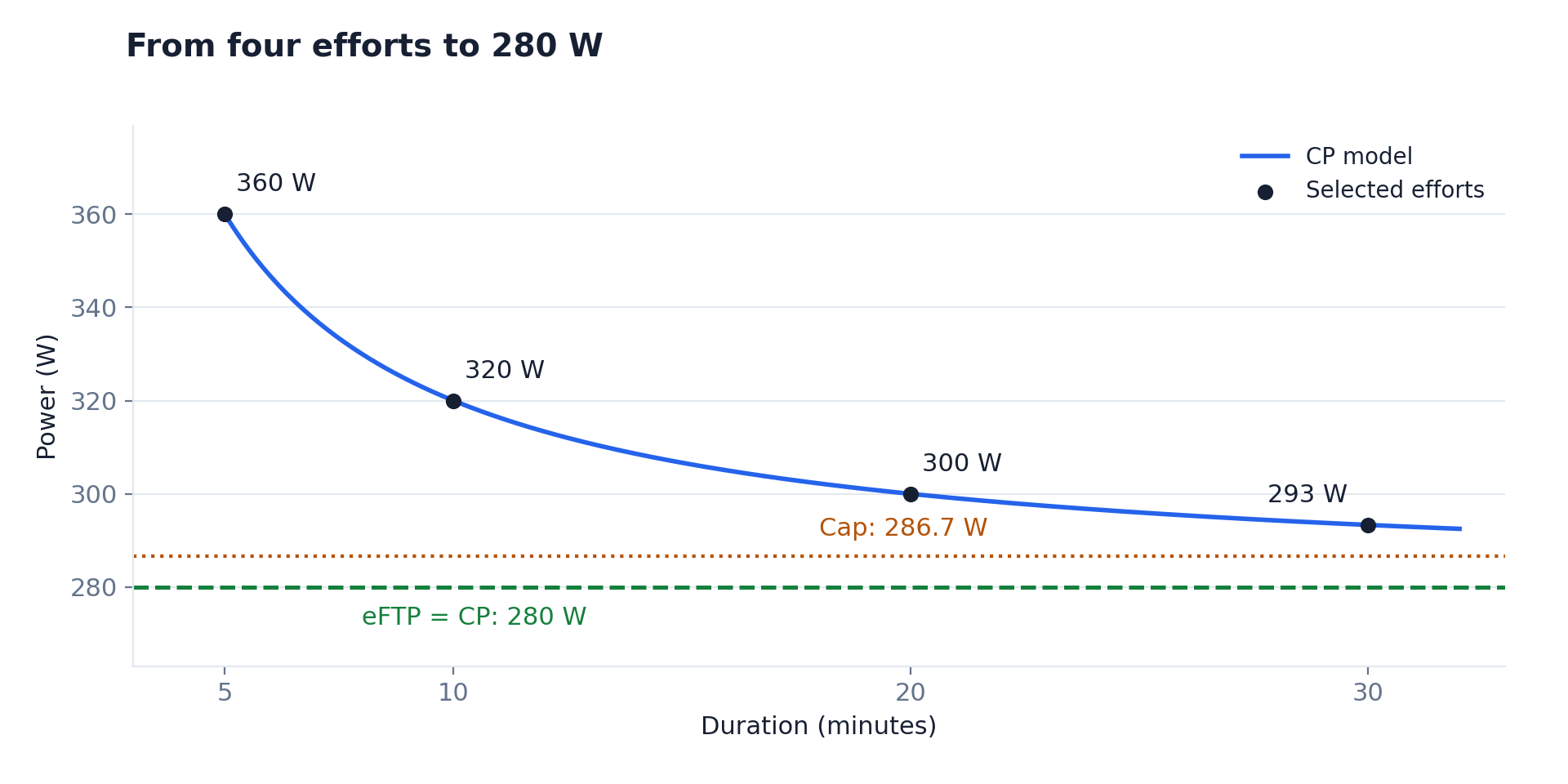
The fallback behaves differently. A single twenty-minute effort at 300 W produces 285 W from the 95% limit, without a fitted CP or W′. A 5/20 pair at 360 W and 300 W produces CP 280 W, capped at 285 W, and therefore returns 280 W. A precise numerical result does not mean the evidence is equally broad in all three cases.
What High, Medium and Low confidence mean
The confidence label summarises a deterministic score. It is not a probability that your FTP is correct, and it is not a ± watt error range. The model starts at 66 points for the multi-point fit, 56 for the 5/20 pair, or 38 for the single-anchor fallback.
It then adjusts that base using the efforts actually used by the selected model:
| Component | Score adjustment |
|---|---|
| More durations | +3 per point after the first, capped at +8 |
| Independent activities | +4 per activity after the first, capped at +8 |
| Long efforts | +2 per selected point of at least 20 minutes, capped at +4 |
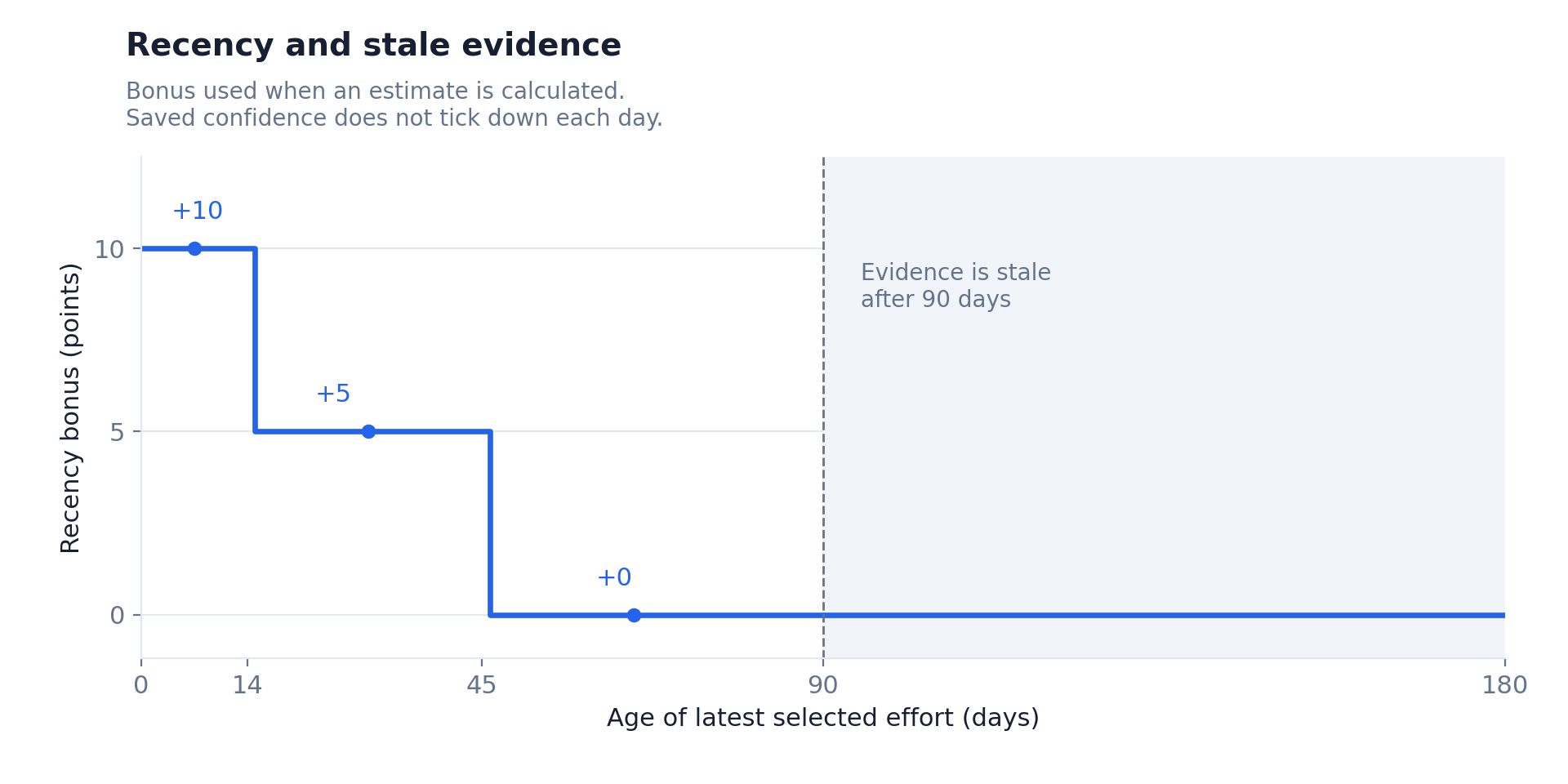
| Latest selected effort at most 14 days old | +10 |
| Latest selected effort 15–45 days old | +5 |
| Model disagreement | Subtract the rounded value of 1.5 × model error percent |
For a CP fit, model error is the mean absolute percentage difference between the fitted power and the selected recorded values. The final score is clipped to 0–100: High starts at 75, Medium at 50, and lower scores are Low.
The worked example scores 92: 66 + 8 for four durations + 4 for two activities + 4 for two long points + 10 for recency, with no model-error penalty. A recent single twenty-minute anchor scores 50, just inside Medium. Older evidence with the same narrow coverage can receive Low confidence.
Why an old estimate can still say High confidence
Evidence is marked stale when its latest selected effort is more than 90 days old. The panel then names its age. A new easy ride will not refresh that date unless one of its efforts enters the selected evidence. Broad, internally consistent evidence can retain a High label while being old.
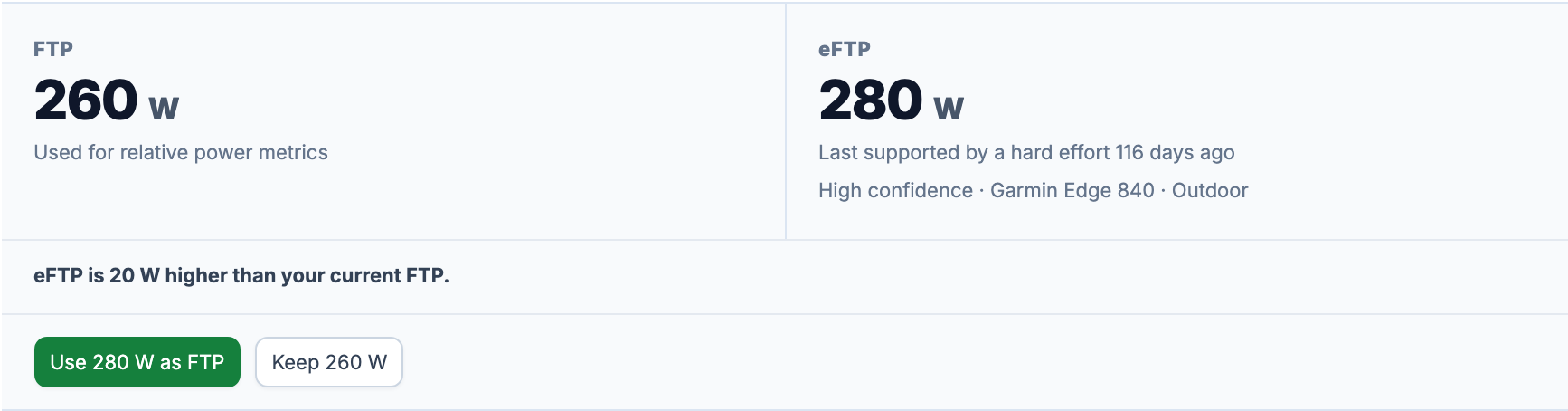
If a later calculation has insufficient or invalid evidence, EffortSignal keeps the last valid estimate. With recent evidence, the panel explains that the latest calculation did not add enough support; with stale evidence, the age message takes priority. The failed calculation does not erase the previous observation or automatically lower your saved FTP.
When a change is offered
The difference must reach the larger of 5 W or 2% of the configured FTP to be classified as a possible increase or decrease. At 260 W, that boundary is 5.2 W: an integer estimate of 265 W is close; 266 W crosses the boundary. Without a configured FTP, an available estimate can be offered as the first value.
Multiple sources are not averaged, and the largest estimate does not automatically win. Where an explicit primary source exists, it takes priority; otherwise selection uses confidence and then calculation freshness. If current valid source estimates differ by at least the larger of 10 W or 5% of the lower estimate, the panel reports source disagreement and withholds the apply suggestion. For example, 260 W and 274 W cross the 13 W boundary. The check includes current valid estimates from separate indoor and outdoor groups.
Indoor evidence is compared with your separate indoor FTP when one is configured, otherwise with the cycling FTP. An accepted indoor estimate targets indoor FTP. The checkbox Use a separate FTP for indoor rides exposes the indoor threshold and its own method fields. Device grouping cannot remove a calibration difference between a trainer and an outdoor meter.
Use the estimate or keep your current FTP
Choosing Use 280 W as FTP saves a dated FTP snapshot and sets its method to EffortSignal eFTP. The page refreshes the FTP field and comparison. The estimate remains a separate observation, even when both numbers now read 280 W.
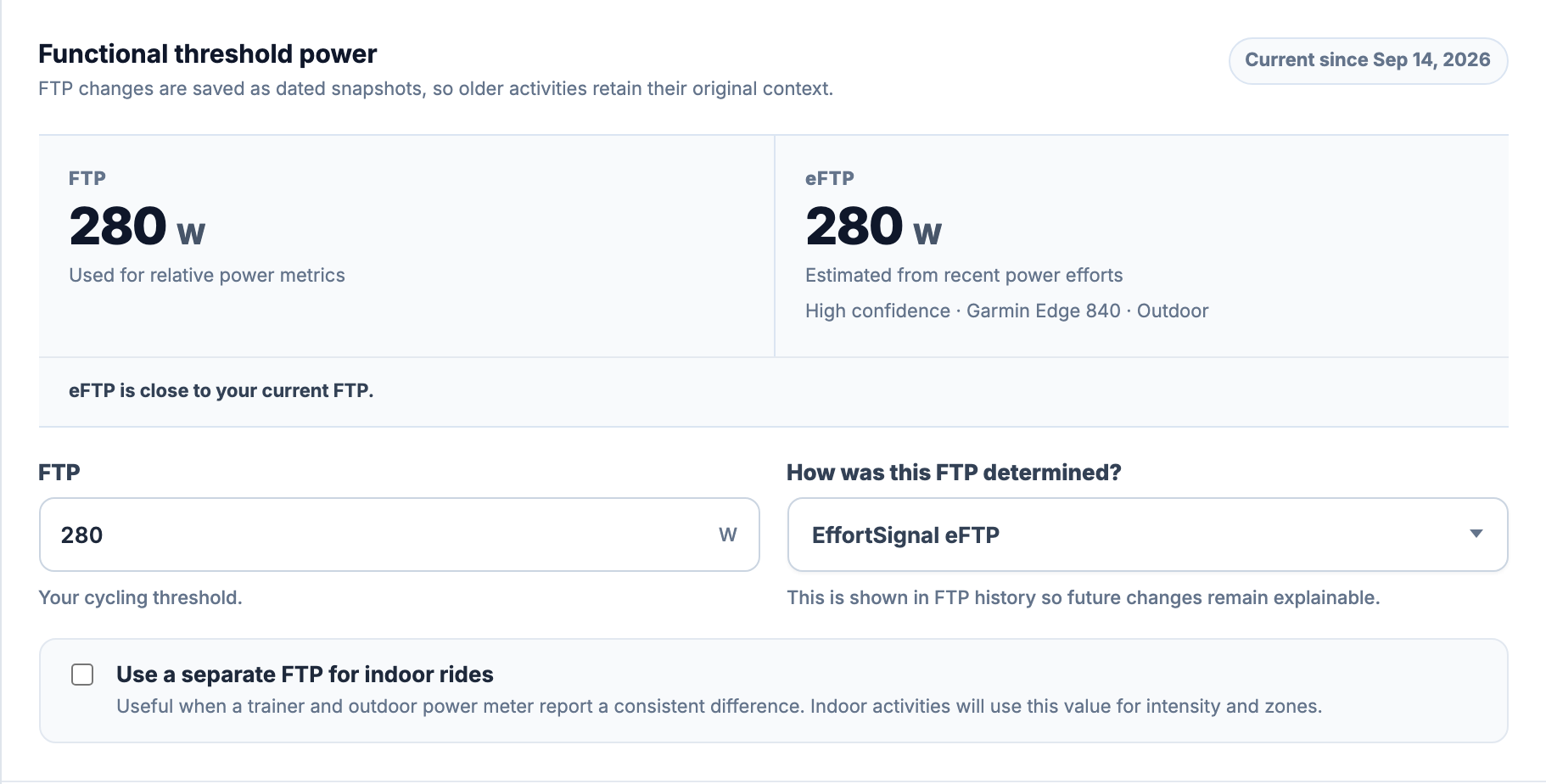
Choosing Keep 260 W records that choice and leaves the active threshold unchanged. It does not stop future calculations. The same estimate is not offered repeatedly after a decision. Following a declined or dismissed estimate, a new suggestion can reappear if its value differs by at least the larger of 5 W or 2% of the previous estimate, its confidence label moves up, a new activity contributes an effort of at least 20 minutes, or 28 days have passed. The new estimate must still meet the current comparison rules.
If you have unsaved changes in Power zones, save or reset them before choosing an eFTP action. The page disables the decision buttons until that draft is settled.
Follow accepted changes in FTP history
Select View FTP history at the top of Power zones. Progress over time draws the saved FTP changes, and Change log lists their dates, watts and methods. Separate indoor values are included when present. Scroll to load older entries.
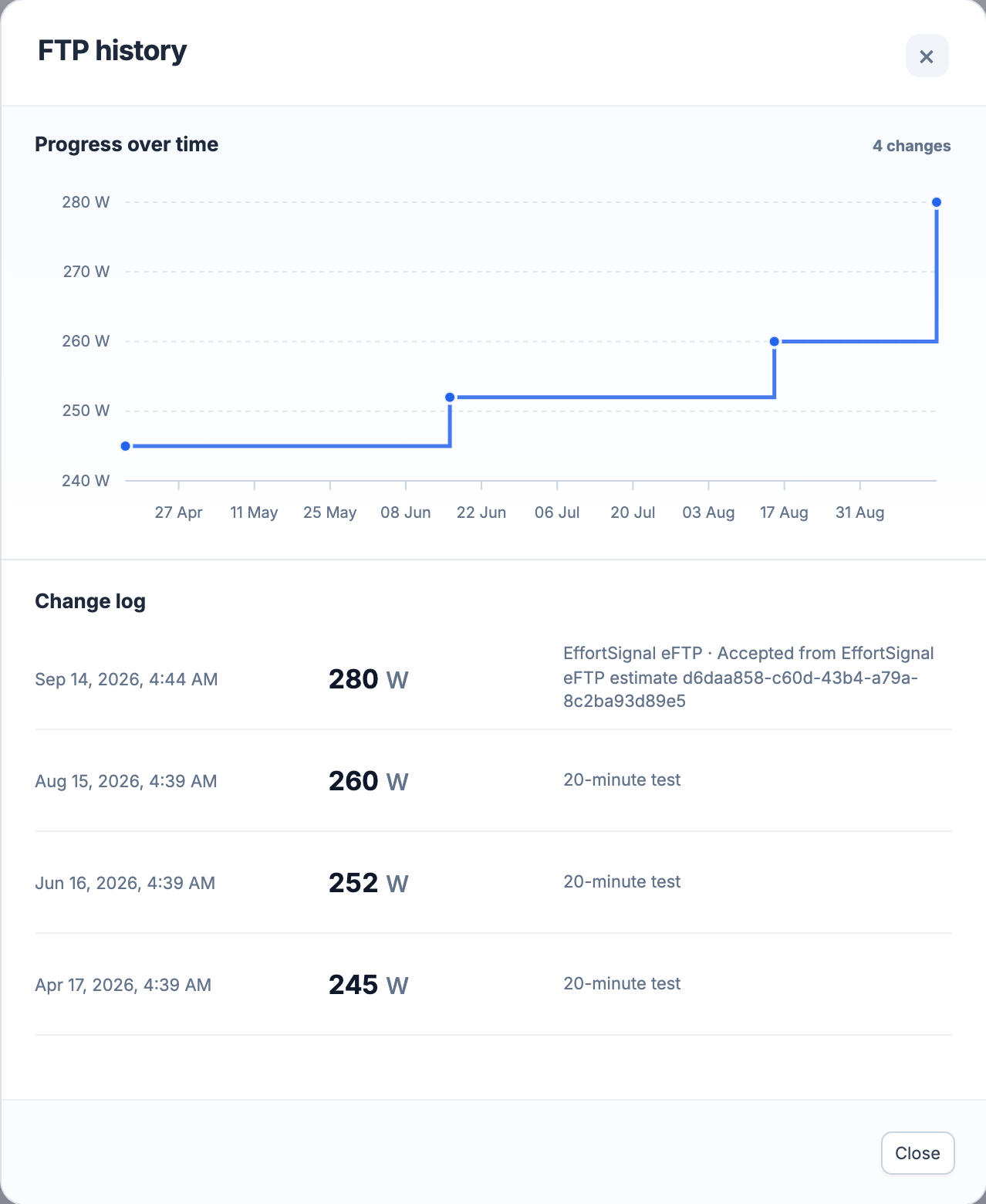
EffortSignal also stores immutable eFTP calculation records with their source, model version and evidence. Those records are separate from the FTP history chart; the current web interface does not provide a dedicated eFTP-history chart.
Why no usable estimate may be available
The panel shows Not available when no valid eFTP exists. Manual FTP settings remain available. Common reasons include missing power samples, no compatible stored duration results, or only short efforts with no target duration of at least ten minutes.
The model rejects non-finite results, an estimate outside 50–2,000 W, and a fitted CP or W′ that is nonpositive or non-finite. Model error reduces confidence; it does not have a separate hard rejection threshold in this version. High confidence therefore does not certify a sensor’s accuracy or prove that the rides were maximal tests.
A new compatible power-curve result queues a source-specific eFTP calculation. Simply viewing Power zones does not run a new fit or change a threshold. Because the evidence window spans 180 days, strong old efforts can remain selected through a quieter training block. Read the support date as well as the number.
Methodology notes
The examples describe EffortSignal’s saved eFTP v1 calculation, checked September 14, 2026. Its numerical examples were run through the same calculation functions used by the application.
The critical-power model describes the relationship between power and the duration for which it can be sustained. Clarke and Skiba’s review of performance modelling provides background on that model. EffortSignal’s 180-day window, duration selection, 0.07 conversion, upper limit and confidence rules are product-specific choices; that paper does not validate those choices as a package.
All Pro features are free through January 31, 2027. No credit card or automatic charges. After Early Access, keep using Free or choose Pro. See Free and Pro plans.